
Almost every serious FPL tool asks you for a league ID at some point, and almost nobody knows where theirs is. It isn't displayed anywhere in the FPL app, it isn't in your account settings, and — unlike your team — you can't search for a league by typing its name.
Here's the fast way, the manual way, and the reason the obvious approach doesn't work.
The Fastest Way: Type Your Manager Name
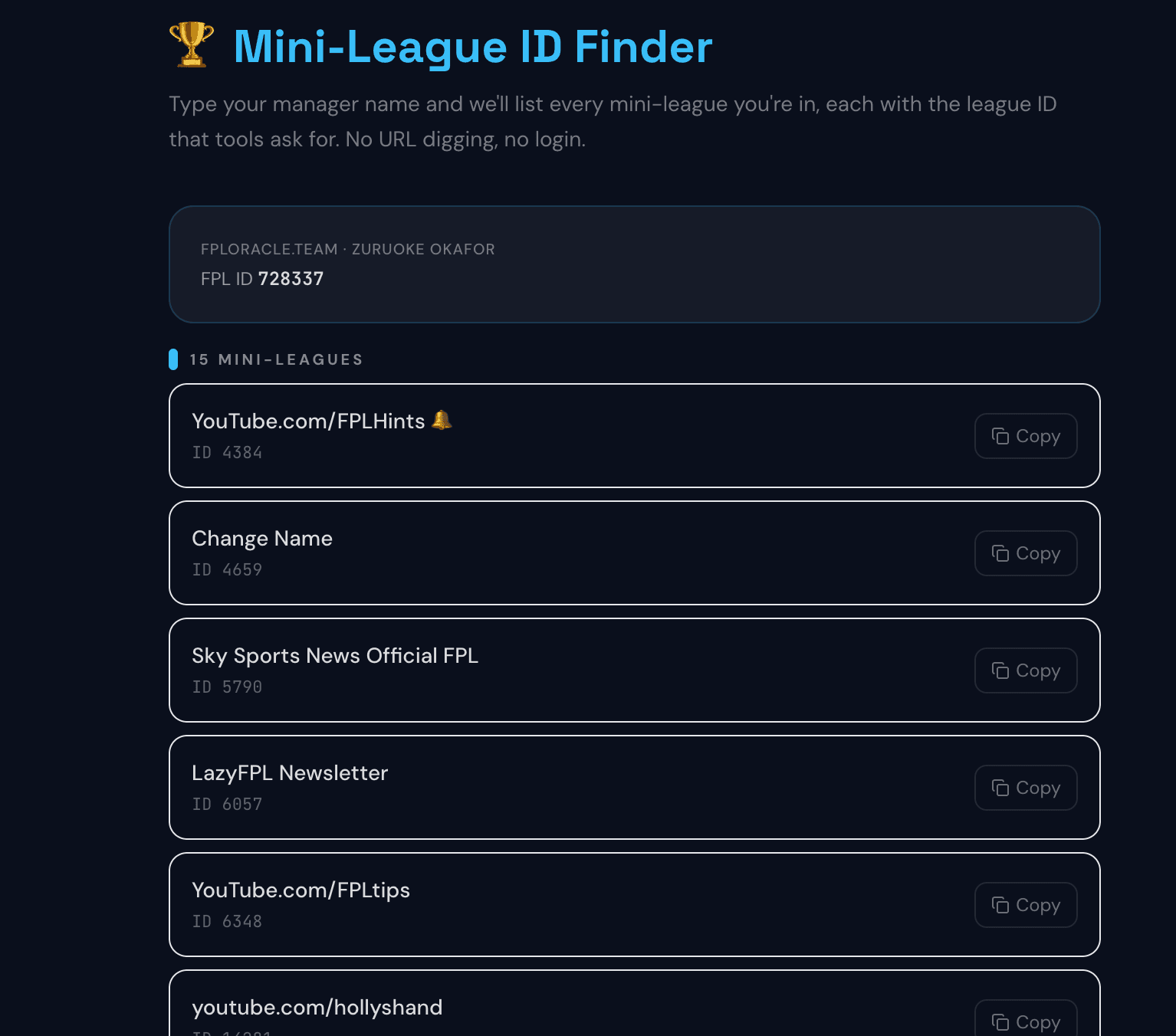
The FPL Mini-League ID Finder takes the long way round on your behalf. Type your manager name, your real name, or your team name — whatever you actually remember — pick your team from the live results, and it lists every private mini-league you're in, each with its league ID and a copy button.
No login. No account. No hunting through URLs. It works on a phone exactly as it does on a desktop, which is the part that matters, because the manual method below is genuinely awkward on mobile. It's one of five free tools that between them replace a manually maintained spreadsheet.
One thing it deliberately leaves out: FPL's global and country leagues. Those contain millions of managers, and no rival analysis you'd ever want to run is meaningful at that scale, so only your private classic leagues are listed.
Why You Can't Just Search for a League by Name
This is the first thing everyone tries, so it's worth explaining rather than leaving you to discover it.
FPL exposes no way to search leagues by name. A league is only reachable two ways: by its ID, or through a manager who happens to be in it. There is no public directory, no search endpoint, and no third-party tool that can offer one — not because nobody has built it, but because the underlying data doesn't exist to build it from.
Which is why every genuine route to a league ID starts with a person. You find the manager, then you read the leagues attached to their team. The finder above just does both steps in one go.
What Is an FPL League ID?
Your league ID is a unique number FPL assigns to each mini-league when it's created. It identifies that specific league among the millions in the game, and it's what any tool needs in order to pull the standings, the managers in it, and their squads.
It's a different number from your team ID, and confusing the two is the single most common reason a tool "doesn't work" — more on that below. League IDs are typically 6 or 7 digits, and unlike your team ID, a league ID does not change between seasons as long as the league itself carries over. Your team ID does change every year, which catches out returning managers — we cover why here.
How to Find Your League ID on Desktop
If you'd rather find it yourself, it's sitting in the address bar:
- Log in at fantasy.premierleague.com.
- Open the Leagues tab.
- Click the mini-league you want.
- Look at the URL. It reads something like
fantasy.premierleague.com/leagues/314159/standings/c. - The number directly after
/leagues/is your league ID.
It stays the same whichever tab of that league you're viewing, so you only need to find it once per league.
How to Find Your League ID on Mobile
The official app has no address bar, so — exactly like your team ID — the app never shows your league ID anywhere. If you've been searching its menus, you haven't missed it.
Two routes work:
1. Use the finder. Open the Mini-League ID Finder in your phone's browser and search your name. Ten seconds, every league at once.
2. Use your phone's browser instead of the app. Open Safari or Chrome, go to fantasy.premierleague.com, log in, tap Leagues, tap your league, then tap once on the address bar to expand the full URL and read the number after /leagues/.
Step four is the one people miss. Mobile browsers shorten the visible URL to just the domain until you tap it, which is why the number looks like it isn't there.
FPL League ID vs Team ID — Not the Same Number
These get mixed up constantly, and the failure is silent: enter the wrong one and a tool simply returns nothing, with no explanation.
| Team ID | League ID | |
|---|---|---|
| What it identifies | Your squad | One mini-league |
| Found in the URL after | /entry/ | /leagues/ |
| Changes each season? | Yes | No |
| Used for | Squad analysis, rank tracking, comparisons | Standings, rival scanning, league tables |
| Find it with | ID Finder | League ID Finder |
If a tool asks for "your FPL ID" it means your team ID — our full guide to finding your FPL team ID covers that one, including why yours changed for 2026/27.
Finding Another Manager's Team ID by Name
The same lookup works for anyone, which is the part that turns a league ID from trivia into something useful.
If you want a rival's team ID to compare squads, a friend's to check what they've transferred in, or a well-known content creator's to see what they actually own rather than what they said on a podcast, type their manager or team name into the ID Finder and pick them from the results.
Nothing here is private. Every FPL team is publicly viewable by ID — that's how league tables work at all, and it's what makes rival comparison possible. Our step-by-step framework for comparing your squad against a specific rival covers what to look at once you've got their number, and what the top 1,000 managers' squads actually look like is the benchmark worth measuring against if you'd rather aim higher than your mini-league.
What About Draft League IDs?
FPL Draft is a separate game on a separate domain, and its league IDs live at a different address entirely. You'll find yours in the URL on draft.premierleague.com rather than the main site, and a Draft league ID won't work in a tool built for classic leagues. If a tool is returning nothing and you play both formats, this is usually why.
What to Do Once You Have It
A league ID on its own is just a number. What it unlocks is the ability to stop guessing about the people you're actually playing against.
Feed it into the Mini-League Spy and Oracle scores the managers around you and shows the players they own that you don't — ranked by how much of a threat each one is this gameweek. That's the difference between knowing you're 40 points behind and knowing that 30 of those points came from one player you keep refusing to buy.
The same logic applies in reverse to your own squad: the players quietly wrecking your rank are usually the ones everyone else owns and you don't, which is a question of effective ownership rather than raw points.
From there, Squad Comparison puts your team side by side with a specific rival, and our guide to winning your mini-league with rival data covers what to actually do with what you find — including when to block a rival's pick and when to ignore it.
The Oracle Takeaway
Your league ID is the number after /leagues/ in the URL of your league's standings page. The app won't show it to you, and no tool anywhere can find a league from its name, because FPL doesn't publish that data.
The reliable route is always through a manager — so the quickest version is to type your name into the League ID Finder and copy every league you're in at once. Then point one of them at the Mini-League Spy and find out what the person above you owns that you don't.
How many mini-leagues are you actually in this season — and are you winning any of them? 👇